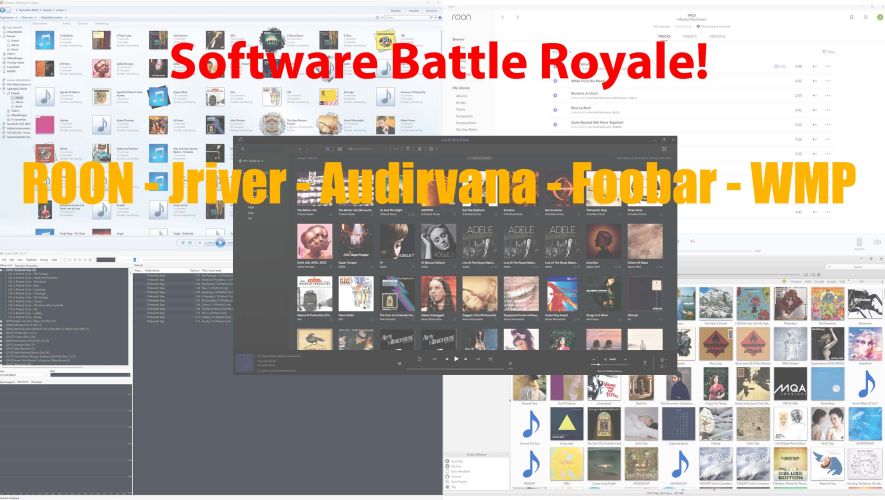
What a wonderful live test of audio software applications. We all learned a lot! The four applications we auditioned all have their own advantages and disadvantages. Foobar is free and sounds good. However, it remains a bit of a hassle for the not-so-tech-savvy user. Audirvana was today's favourite. It sounds great, but if you want streaming, you will need a subscription (Studio). Roon is unprecedentedly pleasant to use, supports almost all streamers, but is pricey. And we liked the Audirvana sound more than Roon.JRiver has its own nifty ASIO driver and numerous options for tweaking. Nice, but not for everyone. You buy the software for 80 Euro and can upgrade to subsequent versions for a favorable additional cost. A friendly model, though. Which one is the best? That's a matter of taste. We found Audirvana to sound the nicest. And Roon remains the most user-friendly. It is the software package that should fit. Try before you buy!
Hi,
nice review/test, thank you!
to see Roon working at its best you could use the ROCK package installed in a dedicated NUC… it seems that WIN10 could not the best friend of good sound when Roon is the player… your collegue/friend Hans (https://www.youtube.com/watch?v=jNfUo0Zqz3Q at min 12:51) didin’t find any different at all between Audirvana and Roon… so ok, probably WIN10 is quite good for email and office 😉
anyway, thank you very much… a channel with very interesting content indeed
We tested all packages on the same computer in the same way. We also have ROON bridge installed on a Win10 machine (our own AudioPC) and that sounds very, very good. Roon Rock on a NUC without the dedicated USB-filters, ethernet cards does not work that well, is our opinion. The OS of course has an impact. But you need some specific Linux distribution to make it better than Windows. Ubuntu, for example, doesn’t sound good at all. But some small distri could sound amazing.
1 year ago
Hi Martijn,
Thanks for your reply.
It’s is very sad. I love Audirvāna sound but hate their remote controller.
Yes Martijn, is very good know this.
Could be a chance of they fix this weak point.
1 year ago
Hi friends from Apha Audio.
There really exist a way to control Audirvāna with others UPNP controllers like JPLAY app?
I read this here but never could implement. If this work with JPLAY in Audirvāna Linux could be a very good solution for me.
Audirvana is a piece of software that works like a UPnP server and has its own UPnP controller interfase: the Audirvana Remote App, which controls the Audirvana server exclusively, next to the interface on Mac and Windows.
JPlay is an app that acts like a UPnP server and a UPnP controller as well.
Both apps stream to a UPnP renderer. A UPnP renderer is a streamer. So, JPlay cannot control Audirvana.
Manage permissions
To provide the best possible experience, we use technologies such as cookies to store and/or access information about your device. By consenting to these technologies, we may process data such as browsing behavior or unique identifiers on this site. If you do not give your consent or withdraw it, certain features and capabilities may be affected.
Functional
Always active
The technical storage or access is strictly necessary for the legitimate purpose of enabling the use of a specific service that the subscriber or user has explicitly requested, or for the sole purpose of carrying out the transmission of a communication over an electronic communications network.
Preferences
Technical storage or access is necessary for the legitimate purpose of storing preferences that have not been requested by the subscriber or user.
Statistics
Technical storage or access used exclusively for statistical purposes.De technische opslag of toegang die uitsluitend wordt gebruikt voor anonieme statistische doeleinden. Zonder dagvaarding, vrijwillige naleving door je Internet Service Provider, of aanvullende gegevens van een derde partij, kan informatie die alleen voor dit doel wordt opgeslagen of opgehaald gewoonlijk niet worden gebruikt om je te identificeren.
Marketing
Technical storage or access is required to create user profiles for the purpose of sending advertisements, or to track the user on a site or across multiple sites for similar marketing purposes.



 English
Hi,
nice review/test, thank you!
to see Roon working at its best you could use the ROCK package installed in a dedicated NUC… it seems that WIN10 could not the best friend of good sound when Roon is the player… your collegue/friend Hans (https://www.youtube.com/watch?v=jNfUo0Zqz3Q at min 12:51) didin’t find any different at all between Audirvana and Roon… so ok, probably WIN10 is quite good for email and office 😉
anyway, thank you very much… a channel with very interesting content indeed
We tested all packages on the same computer in the same way. We also have ROON bridge installed on a Win10 machine (our own AudioPC) and that sounds very, very good. Roon Rock on a NUC without the dedicated USB-filters, ethernet cards does not work that well, is our opinion. The OS of course has an impact. But you need some specific Linux distribution to make it better than Windows. Ubuntu, for example, doesn’t sound good at all. But some small distri could sound amazing.
Hi Martijn,
Thanks for your reply.
It’s is very sad. I love Audirvāna sound but hate their remote controller.
Cheers.
Hi Luciano. According to their own community forum, they are working on a new version of the Remote App. So, wait and see how that turns out.
Yes Martijn, is very good know this.
Could be a chance of they fix this weak point.
Hi friends from Apha Audio.
There really exist a way to control Audirvāna with others UPNP controllers like JPLAY app?
I read this here but never could implement. If this work with JPLAY in Audirvāna Linux could be a very good solution for me.
Cheers.
Hello Luciano,
Audirvana is a piece of software that works like a UPnP server and has its own UPnP controller interfase: the Audirvana Remote App, which controls the Audirvana server exclusively, next to the interface on Mac and Windows.
JPlay is an app that acts like a UPnP server and a UPnP controller as well.
Both apps stream to a UPnP renderer. A UPnP renderer is a streamer. So, JPlay cannot control Audirvana.