





Noise measurements power supply
Contents
We first measure the noise that the adapters send back to the mains. This will not directly affect playback, but can potentially interfere with other devices. Pay close attention to the baseline measurement. To get everything quiet as a mouse, we actually need a shielded tent that completely blocks RF. We don’t have that, so the measurement is not 100% clean. However, we can still spot the differences.
Noise adapter side
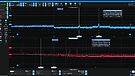
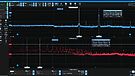
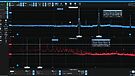
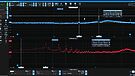
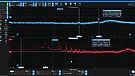
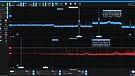
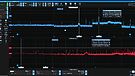
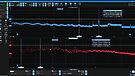
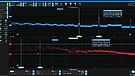
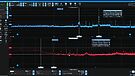
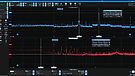
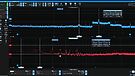
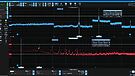
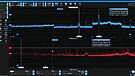
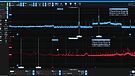
We can see that there is quite a difference between the adapters. Also, we see that the filter has a slight effect on the noise going back. Differential mode seems to increase slightly. Common mode seems to decrease a bit.
Noise net side
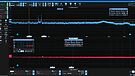
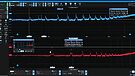
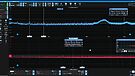
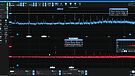
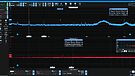
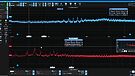
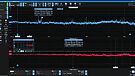
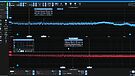
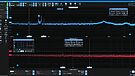
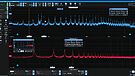
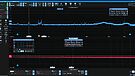
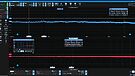
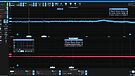
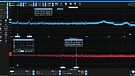
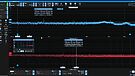
Again, pay close attention to the baseline. There is interference between 160 and 175 KHz that comes and goes. You may think that bump away form this measurement.
The linear PSU we bought from AliExpress doesn’t do badly at all. The spectrum is clean. The filter doesn’t really seem necessary either; we see no significant difference. This is also true of the Sbooster: the differences are small.
What the filter does to switching power supplies is incredible. All switching power supplies improve extremely!
Low Frequency
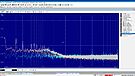
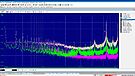
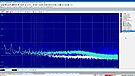
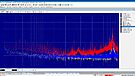
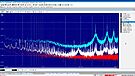
We see a similar pattern here. Although we can see here that in the lower spectrum there does seem to be an improvement in all power supplies. Switching power supplies show extreme improvement; linear is more subtle, but visible. The noise floor is even a bit lower with the filter attached.
PSU stability
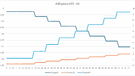
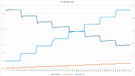
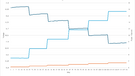
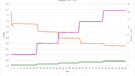
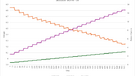
This measurement shows how stable the power supply remains when we increase the load. Every power supply sags a bit; that’s part of physics. The point is that a power supply does not collapse too much when the load is increased. Linear power supplies seem to suffer from this more than switching models.
We have put the voltage drop in a table for you.
Voltage drop
| PSU | load 0.5A | Load 1A | Load 1.5A | Load 2A | Difference |
| Netgear old 12V | 11,7 | 11,6 | 11,5 | 0 | 0,2 |
| Netgear new 12V | 11,82 | 11,7 | 11,65 | 0 | 0,17 |
| IFI iPower 12V | 11,95 | 11,82 | 11,7 | 11,6 | 0,35 |
| Sbooster 5V | 4,85 | 4,7 | 4,56 | 4,44 | 0,41 |
| Ali 5V | 4,92 | 4,87 | 4,77 | 4,7 | 0,22 |
Just joined the club.. I thought this was all BS….
As initial test just bought the 89,- Euro IFI audio Lan silencer. Assume not much more then a kind of opto decoupler (galvanic separation) that gets rid of the cable (Cat 6) LAN noise collected on the way to my streamer.
It does however a lot more then expected. The bass is punchier, deeper, well rounded, some harshness on the edges on the highs sound more rounded, less ‘s’ in the vocals, overall there is more clarity, better mirco details, different tonality in the vocals, more room in the mids, improved 3d soundstage, decay or reverb of instruments more precise. Great upgrade for the money…
Actually need to get used to this new ‘sound’ it takes some life (distortion) out of music as well, it sounds great but also too analytical for my ears.
Still think you better spend 300 Euro on a set of decent speaker cables first then on a router, but if you got all things right already, Upgrading the Lan connection may unexpectedly do more then you think.
Tested the IFI silencer on:
-Wiim Ultra
-Eversolo DMP-A6 gen1 (upgraded with linear power supply)
On the stereo set using the Wiim ultra the experience is similar as upgrading the Eversolo with a linear power supply.
Setup 1:
Wiim Ultra – usb out fixed setting 32bit 192Khz – to a Fio K11 R2R dac (Brz hifi linear power supply) which plays to a Cayin EL34 tube amp – Triangle Comete 40 speakers.
Setup 2:
On the set using the DMP-A6 not a real difference noticed, this one is standard behind a Netgear switch (with original switching power supply). The DMP-A6 plays via Hdmi cable – Yamaha RX-1060 receiver – via pre out to Schiit tube pre amp – Wilsenton R8 El34 tubes. This Hybrid setup plays to 12 speakers (Piega, Dali, Sound Artist) For music usually use 7 stereo setting, For gaming and movies Dolby Atmos, DTS-X depends on the source.
I am a believer in good linear power supplies, will check what happens 3 swtiches to go. Also will upgrade to Cat 8 cables on some positions.
We know now for sure it is audible and needs some money…
Thank you very much for testing !!
Hi guys!
Thank you for your work and sharing it.
Could you please clarify which Lineair power supply from AliExpress did you use?
Thank you.
Greatly appreciate it
BRZHiFi… 5V
Sir,
Thank you!
Sean
You are very welcome
Sirs,
Trying to follow your D-Link advice but cannot distinguish DGS-108 Version 3 from 4.
D-link does not assist and email to D-Link not returned.
Mine also says on Box: 8 port Gigabit desktop switch. One light on each port.
On bottom says: H/W Ver.:E1.
Very much enjoy your testing!
Best!
Sean
Hi Sean. Version E1 is version 4. Version 3 is indicated as C6.
I’ve used an iFi SupaNova (included filter) power cable in the network box + an IEC C14 to Schucko female before the distributor for switches. This way all the equipment (router, switches, media converters) benefit from the power filtering.
For grounding the switches (better said, EMI/RFI draining) one can also use the ToughCable Connector Ground from Ubiquiti which can be plugged in one free Ethernet port. I prefer padding the interior of metal casing of the switch with copper adhesive foil and insert a drain copper wire or screw and then plug it (with a regular banana connector) to the special jack in the iFi / SilentPower AC iPurifier (that can be plugged in a free Schucko outlet).
a question: what kind of filters did you use?
It is a filter between the power supply and the switch.
the question was more related to brand and model
hi Jaap. Can you share information about the filter?
Can you elaborate bit more on this?
“What we clearly see with all switches is that it is crucial to ground things properly: that significantly reduces the noise floor. “
What else do you need to know? Grounding the switch – for example the casing – lowers noise.
There’s no ground connectors on normal switches so I o wondering how you go about this. Entreq for example have ground RJ45 connectors connected to ground boxes. But as I understand you you mean adding a cable to the chassis somewhere and connect to mains ground or?
The D-Link switch has a grounding screw on the case, for instance. Connect a wire from the case, with the D-Link from the screw, to the earth connection of an earthed plug and put that plug into an earthed socket. We tested it like that a few times, and it is clearly audible.
Only do so when you know what you are doing.